

 By
By The Bangbet paybill number to use is the business number shown in your Bangbet cashier, also listed in the key facts box below once confirmed. We found no reputable public source for it, so do not copy a number from a blog or a forwarded message. The easiest way to deposit is the cashier's M-Pesa prompt: type the amount, confirm with your PIN, done. 18+ only.
Deposit with the M-Pesa prompt
- Log in on the site or Bangbet app.
- Open Deposit and choose M-Pesa.
- Enter the amount in KES.
- Check your phone for the STK pop-up and enter your M-Pesa PIN.
- Wait for the M-Pesa SMS, then refresh your Bangbet balance.
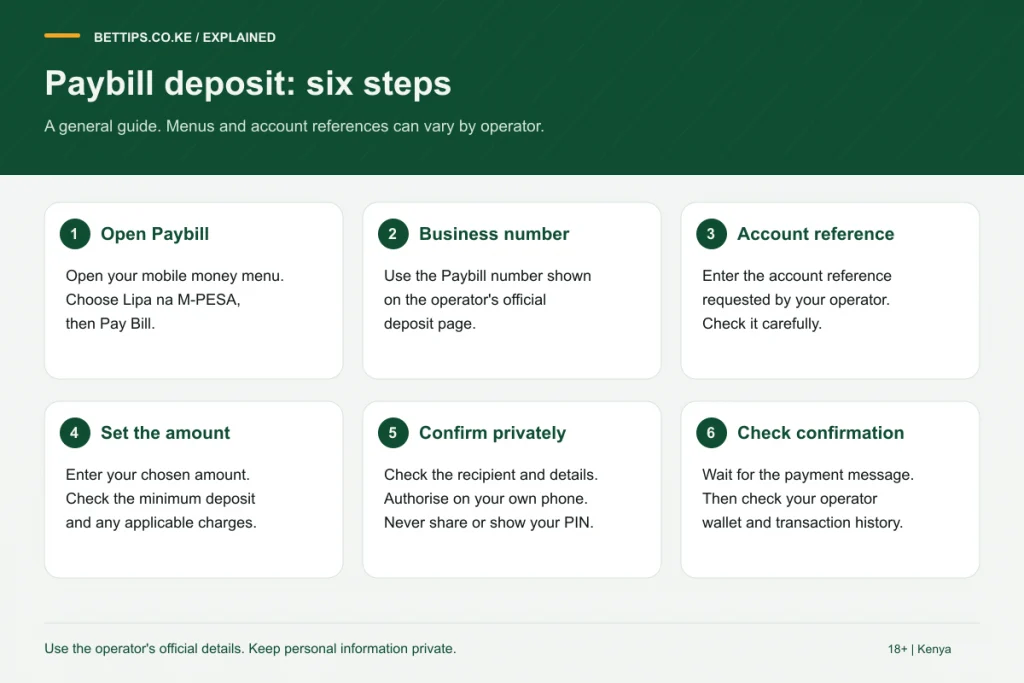
Deposit with Lipa na M-Pesa, Pay Bill
| Field | Enter |
|---|---|
| Business number | or the number in your Bangbet cashier |
| Account number | What the cashier specifies, usually your registered phone number |
| Amount | At least the minimum shown in the cashier |
After paying, read the M-Pesa confirmation. The recipient name should match the operator. If it names another business, Bangbet will not receive the money.
Bangbet withdrawal to M-Pesa
- Open Withdraw in your account menu.
- Enter the amount, within the limits on screen.
- Confirm. Funds go to the M-Pesa line registered on your account.
Bonus money usually cannot be withdrawn until its conditions are met, and first payouts can trigger identity checks. Withholding tax on winnings is deducted before payment and excise duty when you deposit; the betting tax guide explains why the numbers differ.
Simple checks that prevent most payment problems
Before any deposit, confirm three things: the phone in your hand carries the SIM registered on Bangbet, your M-Pesa balance covers the amount, and the cashier shows Kenya and KES. Keep the M-Pesa confirmation SMS until the money is in your wallet; the transaction code in it is the first thing support will ask for.
Airtel Money and other methods
We only confirmed M-Pesa for Bangbet in Kenya. If you use another wallet, check the cashier for options before sending money. Do not use agents who offer to "load" your account for a fee.
When a deposit or withdrawal goes wrong
| Symptom | Cause | Action |
|---|---|---|
| M-Pesa charged, balance unchanged | Account number mismatch or delay | Send the transaction code to support |
| Recipient name is wrong | Wrong business number | Contact Safaricom and the recipient |
| Withdrawal button greyed out | Bonus funds or verification pending | Check account messages |
| Less money on M-Pesa than requested | Withholding tax | Normal; check the payout note |
Use the official channels on our Bangbet customer care page for anything unresolved. For other bookmakers' payment options, see M-Pesa betting sites, or go back to the Bangbet review.
Frequently asked questions
Why does BetTips.co.ke not print the Bangbet paybill?
We found no reputable source confirming it. The number in your Bangbet cashier is the correct one.
What account number do I use for Bangbet?
Follow the cashier instructions; it is usually your registered phone number.
How do I withdraw from Bangbet?
Open Withdraw, enter the amount and confirm. The payout goes to your registered M-Pesa line after tax.
Can I deposit on Bangbet with Airtel Money?
We only confirmed M-Pesa. Check the cashier for other options before sending money.