

 By
By The Bongobongo paybill number is printed on the operator's deposit help page and repeated in the key facts box below; use your registered mobile number in the account field. You can also skip the paybill and deposit straight from the site, which sends an M-Pesa PIN prompt to your phone. Withdrawals go back to your registered M-Pesa wallet from the Withdraw option in your profile.
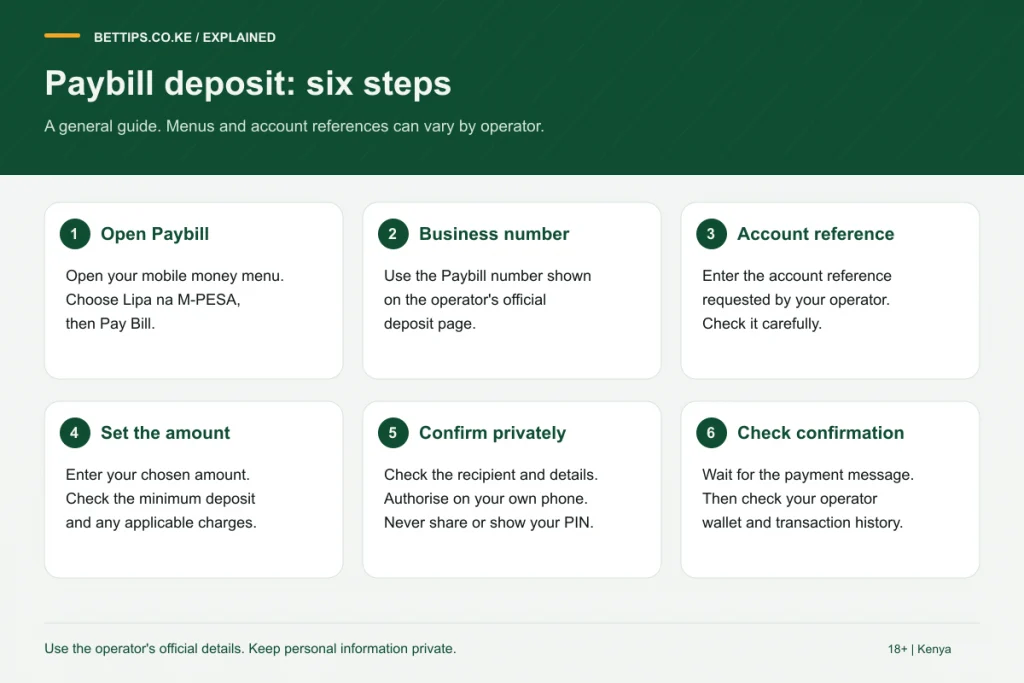
Option 1: deposit with the Bongobongo paybill
- Open the M-Pesa menu on your Safaricom line.
- Choose Lipa na M-Pesa, then Pay Bill.
- Enter the business number shown in the key facts box.
- Enter your phone number, the one registered on Bongobongo, as the account number.
- Type the amount. The minimum is shown in the key facts box.
- Enter your M-Pesa PIN and confirm.
The deposit should appear in your balance within moments of the M-Pesa confirmation SMS.
Option 2: deposit from the site or app
- Log in and tap Deposit.
- Type the amount and confirm.
- A Safaricom prompt pops up on your phone. Enter your PIN.
- Wait for the M-Pesa SMS and check your balance.
This route is handy because you never type the business number, so there is no risk of sending money to the wrong paybill.
Bongobongo withdrawal
- Log in and open your profile.
- Choose Withdraw and type the amount. A minimum withdrawal applies, shown on the withdraw screen.
- Confirm. The money goes to the M-Pesa wallet linked to your account.
According to the operator's withdrawal help page, most withdrawals are instant, while larger ones can take a little longer. If it is slower than that, check whether part of your balance is bonus money or whether your account needs verification.
Fees, tax and why the numbers differ
| Charge | Who takes it | Where you see it |
|---|---|---|
| Operator fee | None, according to Bongobongo | Not applicable |
| Mobile money fee | Your provider, if any | M-Pesa or Airtel SMS |
| Excise duty on deposits | Government, deducted by operator | Deposit history |
| Withholding tax on winnings | Government, deducted by operator | Bet or withdrawal details |
Tax rules changed in July 2025 and July 2026, so we do not print rates; our betting tax guide explains how they work.
Airtel Money
Airtel Money is listed among Bongobongo's payment methods. Choose it on the deposit screen and approve the prompt on your Airtel line. Withdrawals normally go back to the method and number registered on your account, so check this before switching between networks.
Fixing payment problems
- Wrong account number: send the M-Pesa code to support so they can match the payment.
- Wrong business number: contact Safaricom immediately through its official channels to request a reversal.
- Withdrawal shows paid but no SMS: check your M-Pesa statement, then contact support with the withdrawal time.
See our Bongobongo customer care guide for official contacts. To compare payment options at other bookmakers, visit the M-Pesa betting sites page, or go back to the full Bongobongo review. Deposit only what you can afford to lose; betting is for adults 18+ only.
Frequently asked questions
What account number do I use for the Bongobongo paybill?
Your phone number, the one registered on your Bongobongo account, according to the operator deposit help page.
Does Bongobongo charge withdrawal fees?
Bongobongo says it charges no fees on deposits or withdrawals. Your mobile money provider and government taxes are separate.
How fast is a Bongobongo withdrawal?
The operator says most withdrawals are instant and larger amounts can take a few minutes longer.
Can I deposit to Bongobongo with Airtel Money?
Yes. Airtel Money is listed as a payment method alongside M-Pesa.