

 By
By The SportPesa paybill number to use is the one shown in your SportPesa cashier and in the key facts box below, and the account number is normally your registered phone number. In M-Pesa choose Lipa na M-Pesa, Pay Bill, enter the business number, your phone number as account, the amount and your PIN, then check that the confirmation SMS names SportPesa before you bet. 18+ only.
Why the caution? Over the years, different business numbers have been linked to SportPesa, and during the 2019-2022 licence dispute regulators blocked several of them. Third-party lists still mix old and new numbers. The cashier inside your account is the source that counts.
| M-Pesa screen | What to enter |
|---|---|
| Business number | or the number your SportPesa cashier shows |
| Account number | Your registered phone number, unless the cashier says otherwise |
| Amount | Any amount above the minimum deposit shown in the cashier |
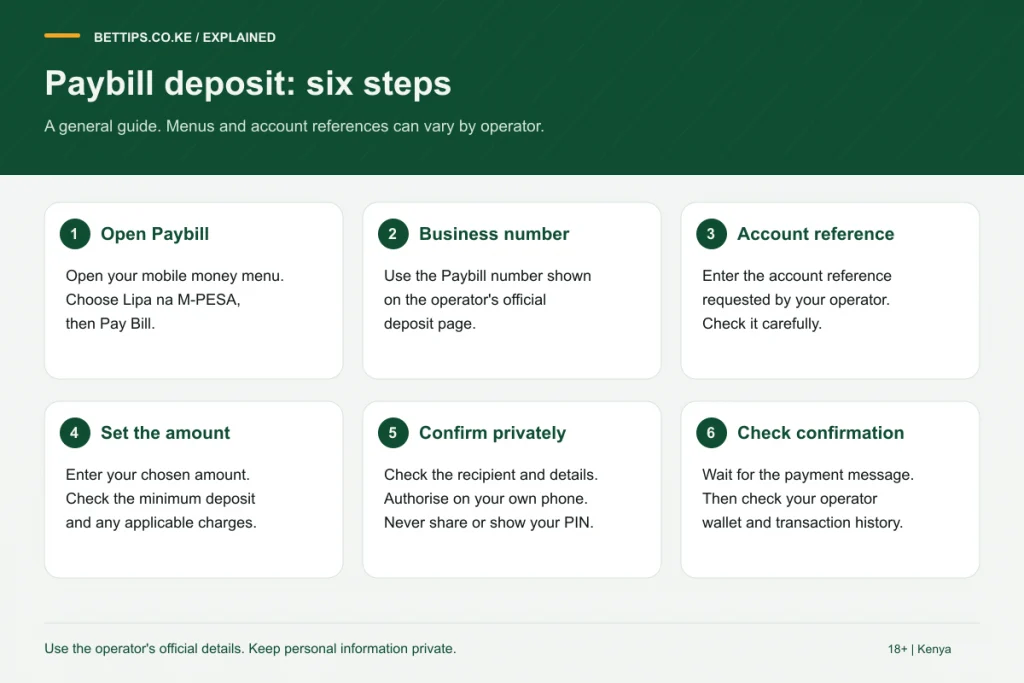
Paying with the SportPesa paybill, step by step
- Open M-Pesa from the SIM toolkit or the M-Pesa app.
- Select Lipa na M-Pesa, then Pay Bill.
- Type the SportPesa business number from your cashier or the facts box.
- For account number, enter the phone number your SportPesa account is registered with.
- Enter the amount in KES and your PIN.
- Read the confirmation: the recipient should be SportPesa. If not, stop and contact Safaricom.
The faster route: deposit from the site
In the SportPesa cashier you can type an amount and receive an STK push on your phone. You just enter your PIN on the pop-up, so there is no business number to mistype. This needs the registered SIM in your hand and a phone that is switched on.
Airtel Money deposits
SportPesa announced deposits and withdrawals through Airtel Money under a partnership with Airtel Kenya. If your account uses an Airtel line, open the cashier to see the Airtel option and follow the prompts. Do not route money through third-party agents.
How to withdraw money from SportPesa to M-Pesa
- Log in and choose Withdraw.
- Enter the amount and confirm.
- The payout goes to your registered mobile money line.
Withholding tax on winnings is deducted before payment, and excise duty is charged on deposits, so your wallet can show less than you sent. See our betting tax guide for the current rules. More detail on payouts and early cash out is on the how to cash out on SportPesa page.
Deposit problems and fixes
| What happened | Likely reason | What to do |
|---|---|---|
| Money left M-Pesa but balance unchanged | Account number did not match your SportPesa phone number | Send the M-Pesa code to SportPesa support |
| Confirmation names another business | Wrong business number | Contact Safaricom and the recipient; SportPesa cannot see the payment |
| Wallet credited with less | Excise duty on deposits | Normal; check the tax note |
| No STK prompt | Phone locked or SIM menu busy | Retry, or use the paybill route |
Official contacts are on our SportPesa customer care page. To compare payment options across bookmakers, see M-Pesa betting sites.
Frequently asked questions
What is the SportPesa account number for paybill?
Normally the phone number your SportPesa account is registered with. Follow any different instruction shown in your cashier.
Why do websites show different SportPesa paybill numbers?
Several business numbers have been linked to SportPesa over the years, and some were blocked during the 2019-2022 licence dispute. Use the number in your cashier.
Can I deposit on SportPesa with Airtel Money?
Yes, SportPesa announced Airtel Money deposits and withdrawals through a partnership with Airtel Kenya.
Why did my SportPesa balance get less than I sent?
Excise duty is deducted from betting deposits under Kenyan law. Check the tax note on the deposit screen.
How do I withdraw from SportPesa to M-Pesa?
Log in, open Withdraw, enter the amount and confirm. The money goes to your registered line after tax deductions.